A plate that stays still during cooking is more than a minor inconvenience. A microwave turntable failure can cause cold spots, overheated edges, and food that needs repeated heating cycles. For homes, offices, cafés, and other workplaces in Singapore, the issue can quickly disrupt daily routines.
The good news is that a non-rotating turntable does not always mean the microwave has reached the end of its life. Sometimes the problem is as simple as an incorrectly seated roller ring. In other cases, the turntable motor, drive coupler, door switch, or control board needs professional attention. The key is to identify what is safe to check yourself and when to stop.
What a microwave turntable does
The turntable rotates food through the microwave energy field so heat is distributed more evenly. It does not create heat itself. Instead, it helps prevent one area of the dish from receiving most of the energy while another area receives too little.
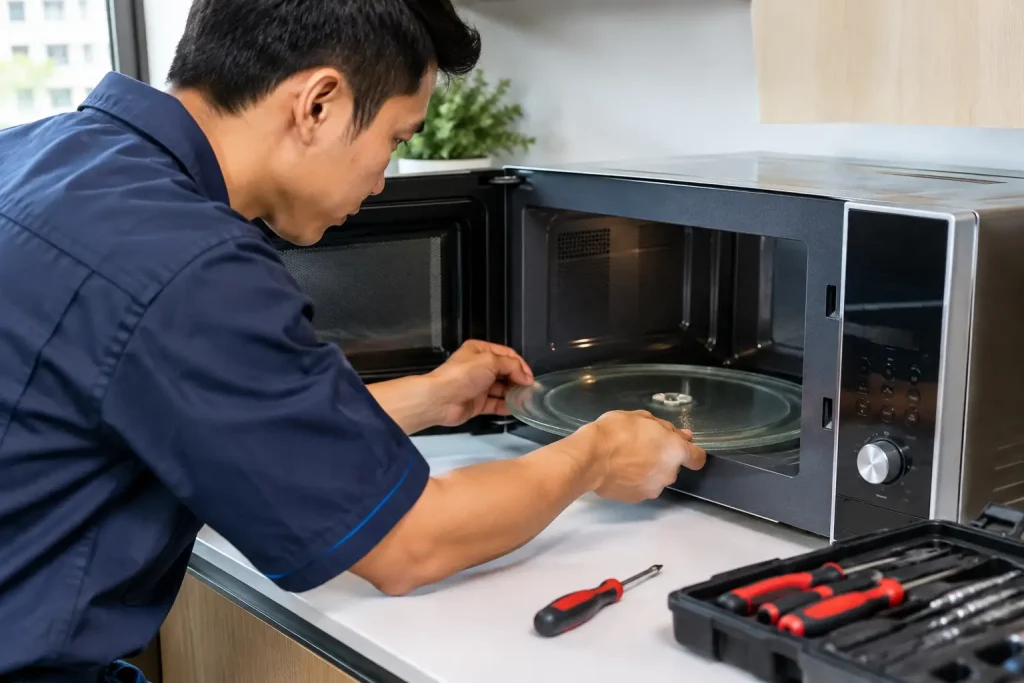
Most microwaves use four parts for this function: a glass tray, a roller ring with small wheels, a plastic drive coupler in the center, and a motor underneath the cavity floor. When the microwave runs, the motor turns the coupler, which moves the tray.
Some microwave models allow the turntable to be switched off for large rectangular dishes. Check the control panel and user manual first. If the turntable-off setting is not enabled and the tray still will not move, troubleshooting is warranted.
Common microwave turntable failure causes
The tray or roller ring is out of position
This is the simplest and most common cause. The glass tray may not be sitting properly on the center coupler, or the roller ring may have shifted out of its circular track. Food spills, grease, crumbs, or a small broken wheel can also stop the ring from moving freely.
Remove the tray and roller ring when the microwave is unplugged. Clean the cavity floor, roller track, and underside of the tray with a soft cloth. Then place the roller ring back evenly and lower the tray onto the center coupler. The tray should sit level and turn smoothly by hand.
Avoid running a microwave with a heavily cracked tray, missing roller wheels, or a warped roller ring. These parts can place extra strain on the drive motor and may damage the microwave floor over time.
A damaged drive coupler
The coupler is the small plastic piece in the center of the microwave floor that connects the motor shaft to the tray. Its grooves can wear down, crack, or become rounded after years of use. When this happens, the motor may run but cannot grip the tray securely.
A worn coupler can sometimes make a clicking, grinding, or intermittent slipping sound. You may notice that the tray turns only when it is empty, then stops once a dish is placed on it. Replacing the correct coupler is usually a straightforward repair, but the replacement must match the microwave model and shaft design.
A faulty turntable motor
If the tray, ring, and coupler are correctly fitted but the turntable remains still, the motor is a likely cause. Turntable motors can fail due to normal wear, moisture, electrical faults, or damage from a jammed tray.
A failed motor may be silent, hum without turning, or operate intermittently. Accessing it generally requires removing the microwave casing or lower panels. This is not recommended as a DIY repair. Microwave ovens contain high-voltage components that can retain a dangerous electrical charge even after the appliance has been unplugged.
A door switch or latch problem
A microwave has safety switches that confirm the door is fully closed before cooking begins. If a switch is worn or misaligned, the microwave may appear to operate but certain functions, including the turntable, may not work as expected. You may also see inconsistent starting, unusual clicking, or a microwave that stops when the door is moved slightly.
Door switch faults need proper diagnosis. Continuing to use a microwave with a loose door, damaged latch, or unreliable operation is not advisable. The door safety system is essential to safe appliance use.
A control board or wiring fault
On some models, the control board supplies power to the turntable motor. A damaged relay, burnt connection, loose wire, or failed electronic component can prevent the motor from receiving power. This is more likely if the turntable issue started after a power surge, if the microwave has other erratic functions, or if the display and buttons behave unusually.
Control board repairs can be worthwhile for a newer premium, built-in, or commercial microwave. For an older countertop model, the repair cost may be close to the cost of replacement. A technician can assess the condition of the appliance before you spend money on parts.
Safe checks before arranging microwave repair
Start by unplugging the microwave. Never remove the outer metal cover or attempt to test internal electrical parts. The following checks are safe and often reveal simple mechanical problems:
- Confirm that the turntable-off function has not been selected.
- Remove and clean the glass tray, roller ring, and center area of the cavity.
- Check whether the roller ring has damaged, missing, or stuck wheels.
- Inspect the drive coupler for cracks, looseness, or worn grooves.
- Make sure the dish is not too large, too heavy, or rubbing against the cavity wall.
After reassembling the tray, place a cup of water in the center and run the microwave briefly. Watch through the door window. If the tray does not rotate, or if you hear harsh grinding, repeated clicking, or a burning smell, stop the cycle and unplug the appliance.
Do not use metal objects to force the coupler, and do not continue cooking with a tray that repeatedly jams. While a microwave can still heat food without a turning plate, uneven heating may leave parts of the food cold and may cause messy boil-overs in one area of the dish.
When a professional repair makes sense
Professional diagnosis is recommended when cleaning and reseating the turntable parts does not solve the issue. It is also the sensible choice if the microwave trips power, smells burnt, sparks, makes loud electrical noises, fails to heat, or has a damaged door or latch.
For built-in microwaves, combination microwave ovens, and units installed in business premises, repair is often preferable because removal and replacement can be more involved. A technician can test the motor circuit, switches, wiring, and board safely, then advise whether a spare part replacement is practical.
Repair costs depend on the microwave type, brand, availability of spare parts, and fault found. Replacing a roller ring or coupler is generally less involved than replacing a motor or control board. Built-in models may also require more labor for access and reinstallation. Ask for a diagnosis and repair recommendation before approving major work, especially if the microwave is older or has multiple faults.
Preventing future turntable problems
Turntable components last longer when the microwave is kept clean and used within its intended capacity. Wipe spills promptly, particularly sugary liquids and thick sauces that can harden around the roller track. Always center dishes on the tray and avoid oversized containers that scrape the side walls as they rotate.
Use microwave-safe cookware with a flat base where possible. Uneven or very heavy dishes can drag on the tray and strain the coupler and motor. When removing hot food, lift the dish carefully instead of dragging it across the glass plate.
If the glass tray breaks, replace it with the correct size and shape for the model. A generic plate that does not sit securely on the coupler can create a new turning problem or damage the roller ring.
A microwave with a failed turntable is often repairable, particularly when the heating function and door system are otherwise working normally. Address the fault early, use only compatible parts, and arrange a professional inspection if there are signs of an electrical or door-related problem. That approach protects the appliance and helps restore reliable, even heating.